
Best Way to Recover a Hacked Instagram Account
In short
The best way to recover a hacked Instagram account is the one that matches what the hacker actually changed. If you still have your email, start with the official reset link. If the email and phone were changed, move to video selfie verification and a documented report, and consider professional help under a written contract. No route can be promised to work, but a clear order of steps gives you the best chance.
Published
Contents
- Which recovery method fits which situation?
- How does official Instagram login help work?
- Can I recover by email or SMS reset link?
- What security emails should I check first?
- How does video selfie verification work?
- Can I use a trusted device or a logged-in session?
- What if the hacker changed my email and phone number?
- Why secure your email account first?
- How do I reset the password and log out other sessions?
- Should I enable two-factor authentication?
- How do I review connected apps?
- How do I report the hacked account in the app?
- What evidence should I gather before contacting support?
- DIY recovery or professional help: how do they compare?
- What about business and creator accounts?
- How do I vet a recovery service?
- What is a Scam Check and what does a free case assessment involve?
- What should I do after I get the account back?
- Next step
People searching for this usually want one answer. There isn't a single method, because hacks differ. Some attackers only change a password. Others swap the email, the phone number and the two-factor setup, which closes the easy doors. This guide lines the routes up side by side so you can pick the one that fits.
If you want the broader background first, our page on an instagram account hacked covers the first hour in more detail.
Which recovery method fits which situation?
Start here. Match what you see on screen to the route in the table.
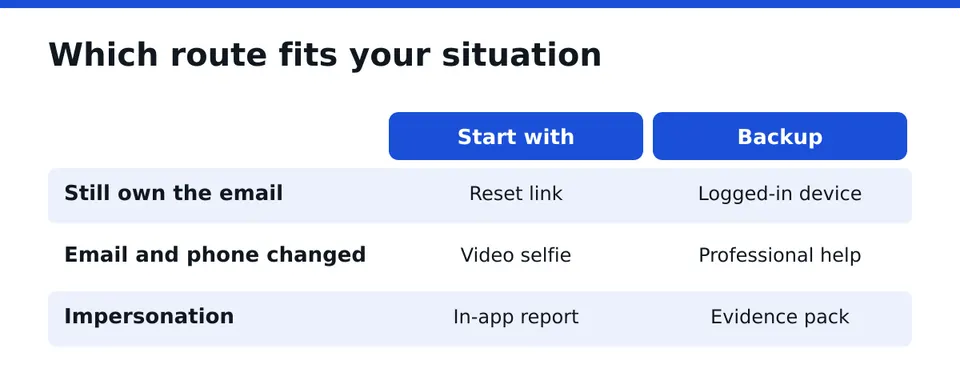
| Situation | Best first route | Backup route |
|---|---|---|
| Password changed, you still own the email | Reset link by email or SMS | Logged-in device or session |
| Email and phone changed by the hacker | Security emails, then video selfie | Professional help |
| Still logged in on another phone | Change password from that device | Log out other sessions |
| Someone impersonates you from a new account | Report in the app | Evidence pack and support |
| Business or creator account with revenue at stake | Official routes in parallel | Professional help under contract |
The rule is simple. Use the cheapest, fastest route that fits, and escalate only when it fails or is not available.
How does official Instagram login help work?
On the login screen, tap Forgot password? or Get help logging in. Enter your username, email or phone number. Instagram then offers a reset option tied to what it has on file.
This is the official self-service route and it costs nothing. It works best when you still control the email or phone on the account. Do it from a device you have used with Instagram before, on your usual network. Recognized devices help.
Do not enter your details on any page you reached through a message or ad. Open the app or type the address yourself.
Can I recover by email or SMS reset link?
Yes, when the hacker has not replaced those contact details. Request the link, open it, and choose a new password that you have never used elsewhere.
If no message arrives, check spam and the promotions tab. Wait a few minutes before requesting again, since repeated requests can make delivery slower. If the link leads nowhere or the code is refused, the contact details have probably been changed. Move to the next section.
What security emails should I check first?
When an account detail changes, Instagram usually sends a notice to the old email address. Search your inbox for messages about a changed email, changed phone number or changed password. Look in spam and trash too.
Such a notice may include a link to revert the change or to secure the account. Act on it quickly, because these links can expire. Make sure the sender and the link are genuine before you tap. If you are unsure, open the app and go through the account settings instead of the email link.
Keep the original message. It is also useful evidence later.
How does video selfie verification work?
When Instagram cannot confirm you through email or phone, it may offer identity verification with a video selfie. You record a short video of your face from several angles in the app or on a page Instagram provides. The purpose is to compare you with the account owner's photos.
A few practical points help:
- Use good light and remove glasses, masks or filters.
- Make sure your face matches photos that appear on the account.
- Do the recording on your own phone, not through someone else.
- Do not hand the video or any code to a third party who contacts you.
If your account shows few or no photos of your face, this route is weaker. A business logo account, for example, may struggle here. Be honest with yourself about that before you spend days on it.
Can I use a trusted device or a logged-in session?
This is the most overlooked route. If any phone, tablet or browser is still logged in, do not log out of it. From that session you can change the password, review login activity and fix the contact details without any reset link.
Go to the account settings, open the security area and look at where you are logged in. Remove sessions you do not recognize. Then update email, phone and two-factor settings. The same applies to a saved login on an old iPhone or Android device in a drawer. Check it.
What if the hacker changed my email and phone number?
This is the hardest case, and the one where people lose time. The reset link now goes to the attacker, so the standard routes fail.
Your options, in order:
- Look for the security email sent to your old address and use its revert link.
- Try the video selfie route.
- Report the account as hacked in the app.
- Gather evidence and ask for professional help if the account matters to your income.
Do not keep trying passwords or requesting codes in a loop. It can trigger extra locks.
Why secure your email account first?
Your email is the master key. If the hacker also has it, every reset you start goes to them. Before anything else on Instagram, sign in to your email from a trusted device, change its password, check forwarding rules and filters, and turn on two-factor authentication.
Then look at the recent activity list and sign out of unknown devices. Only after this should you return to Instagram. Skipping this step is the most common reason a recovered account is lost again.
How do I reset the password and log out other sessions?
Once you are back in, choose a long, unique password. A password manager makes this easy. Then open the account center or security settings and log out of all other sessions. This cuts off anyone who is still signed in.
Also check the email and phone listed on the account. Remove anything you do not recognize.
Should I enable two-factor authentication?
Yes. An authenticator app is stronger than SMS, since phone numbers can be taken over. Save the backup codes offline, not in a screenshot in your cloud photos.
This is the single setting that most often stops a second takeover. We will never ask you for a login code, and neither should any helper.
How do I review connected apps?
Open the settings for apps and websites with access to your account. Remove everything you do not clearly recognize or no longer use. Old scheduling tools, giveaway apps and quiz apps are common weak points.
After removing them, change your password again. Tokens from removed apps should stop working, but a fresh password closes any gap.
How do I report the hacked account in the app?
In the app, use the report option on the profile or the help option on the login screen and choose that the account was hacked. This is also the right action for an impersonator who copies your name and photos from a new account. Ask followers to report the fake profile too.
A report is not a guarantee of a quick answer. It still matters, because it creates a record and starts the review. Write down the date you filed it.
What evidence should I gather before contacting support?
Bring order into the facts. A tidy pack helps both Instagram support and anyone assisting you.
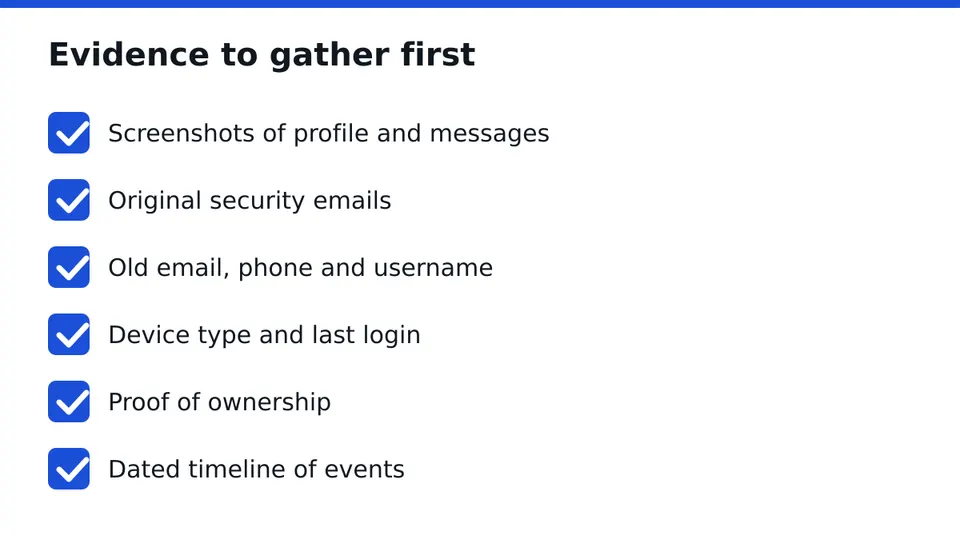
- Screenshots of the hacked profile, any impersonator and strange messages.
- The original security emails, including headers if you can export them.
- Your username, the old email and phone number, and the date you lost access.
- The device type you normally use and where you last logged in successfully.
- Proof of ownership: older photos, a business registration for a company page, ad invoices if relevant.
- A short timeline of what happened, with dates.
DIY recovery or professional help: how do they compare?
Self-service is free and works well for simple cases. Its limit is time and clarity. When contact details are changed, replies can be slow and generic, and the process offers little feedback.
Professional help adds structure, experience with the process and someone who manages the case while you keep running your business. It does not add a secret channel. Nobody outside Instagram can guarantee a result, and you should be wary of anyone who says otherwise.
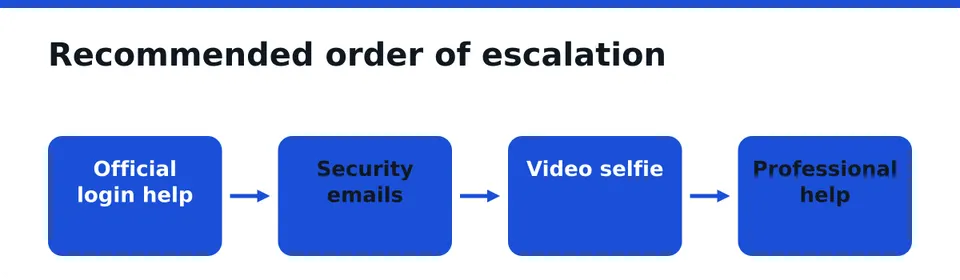
My position: try official routes first and in parallel, because they cost nothing. If the account earns money, holds client conversations or is your brand, bring in help early rather than after weeks of failed attempts. A good instagram account recovery service works with you, not around you. You always log in yourself.
What about business and creator accounts?
For businesses, the damage is not only lost access. Orders go unanswered, ads may keep running, and an impersonator can message your customers with fake offers. Warn your audience through another channel, such as a Facebook Page, email list or website banner.
Check whether the account is linked to a Meta ad account and Page, and secure those as well. Document lost revenue and customer complaints with dates. It supports your case and helps you decide how much to invest in a faster solution.
How do I vet a recovery service?
Fake helpers already target people who have just lost an account. Use these criteria.
- A written contract that states scope, what is delivered and what is not.
- No request for your password or login codes, ever. Only you log in.
- A registered company you can identify, not just a chat handle.
- No guaranteed result or fixed timeline. Honest providers state limits.
- No pressure and no payment through untraceable channels before anything is agreed.
- Clear scope: what they will do with your documents and who sees them.
Warning signs of a scam: a stranger who messages you first, a promise of guaranteed success, a request to "verify" with a code, or a demand to buy gift cards. Walk away from all of these.
What is a Scam Check and what does a free case assessment involve?
Before engaging anyone, including us, you can run a check. Our Scam Check is free and looks at whether a message, offer or helper shows known scam patterns. The free case assessment is a short review of your situation: what happened, what you still have access to, what evidence exists and which route looks realistic. You get an honest view, including when outside help is not needed.
If you go ahead, recovery runs under a written contract, so scope and terms are clear to you before work starts. We are a registered company, and we never ask for your password. Some plans also add Guardian protection with a recovery guarantee, whose terms are written out in the contract rather than implied.
What should I do after I get the account back?
Run this checklist once, calmly.
- Change the email password and enable two-factor authentication there.
- Set a new unique Instagram password and log out all other sessions.
- Switch Instagram two-factor to an authenticator app and store backup codes offline.
- Remove unknown connected apps.
- Confirm the email and phone on the account are yours.
- Check recent posts, DMs, bio links and ad settings for changes.
- Tell followers or customers what happened if the impersonation was visible.
Repeat a short version of this check every few months.
Next step
Not sure which route fits your case? Send us what you see on screen and we will tell you plainly where you stand. Message us on WhatsApp for a free case assessment.
Frequently asked questions
What is the fastest way to recover a hacked Instagram account?
The fastest route is the one that matches your situation. If you still own the email or phone, the reset link is usually quickest. If another device is still logged in, change the password there. If contact details were changed, check security emails and try video selfie verification.
What if the hacker changed my email and phone number?
Look for the security email sent to your old address and use its revert link if it is still valid. Otherwise try video selfie verification and report the account as hacked in the app. Collect evidence, and consider professional help under a written contract if the account is important.
How do I know if a recovery service is a scam?
Be wary if they contact you first, ask for your password or login codes, promise guaranteed results, or refuse a written contract. A trustworthy provider is a registered company, explains its scope, states its limits and lets only you log in to your account.
How long does Instagram account recovery take?
There is no reliable timeline. Simple resets can take minutes, while cases with changed contact details may take much longer and sometimes need several attempts. Anyone promising a fixed number of days cannot back it up. Prepare evidence early to avoid delays.
Should I pay someone to recover my Instagram account?
Try the free official routes first. If the account is tied to income, clients or your brand, paid help can make sense, provided there is a written contract, a clear scope and no request for your credentials. Check the provider before you pay anything.
How do I secure my account after getting it back?
Secure your email first, then set a new unique Instagram password and log out other sessions. Turn on two-factor authentication with an authenticator app, remove unknown connected apps and confirm the email and phone on the account belong to you.
Independent site, not affiliated with Meta, Instagram, Facebook, WhatsApp, iPhone, Android.
Lucas Majewski - Founder, RESCUNO
Lucas is the founder of RESCUNO. His team helps owners of disabled, suspended and hacked Instagram and Facebook accounts, Meta ad accounts and Facebook Pages, working under a written contract and never asking for a password.