
Instagram Mass Reporting: False Reports and What to Do
In short
Yes, false reports can contribute to restrictions or removals, but report volume alone is not a verdict. What matters is what the content actually shows and how the account is reviewed. If you suspect an attack, secure the account, document everything, and appeal with calm, specific wording.
Published
Contents
- Step 1: Work out what mass reporting actually is
- Step 2: Understand how reports are reviewed
- Step 3: Check whether it is an attack or a real violation
- Step 4: Secure the account before anything else
- Step 5: Document the evidence while it is still visible
- Step 6: Appeal with clear, factual wording
- Step 7: Watch for extortion and fake fixers
- Step 8: Keep the business running while you wait
- Step 9: Report abuse and reduce future risk
- Step 10: Know when to ask for assessed help
Step 1: Work out what mass reporting actually is
Mass reporting means many people, or many fake profiles, flag the same account in a short window. The goal is to make the account look risky so it gets limited or taken down. Some groups do it for money, some for revenge, some to remove a competitor.
There is a lot of myth around "report bots" that supposedly guarantee a ban. Treat those claims as marketing. Nobody outside the platform controls the outcome, and anyone who says otherwise is selling something.
Step 2: Understand how reports are reviewed
Instagram uses a mix of automated systems and human reviewers. Automated tools look at content and account signals first. Some cases are passed to people, and some are not. I cannot tell you the exact thresholds, because they are not public, and I will not pretend otherwise.
Does report volume alone cause a ban?
It should not. A report is a signal to look at content, not a vote. The risk is that an automated check misjudges a post, or that an account with an earlier strike is already near a limit. Then a wave of reports can tip a borderline case. That is how false reports end up causing real damage.
Why false reports can still trigger takedowns
Three things tend to combine: a burst of reports on specific posts, content that looks arguable to an automated system, and an account with a thin history or earlier warnings. Remove one of those and the attack often fails.
Step 3: Check whether it is an attack or a real violation
Owners often cannot tell whether a removal came from coordinated reports or from content that really broke the rules. Be honest with yourself here. It changes how you appeal.
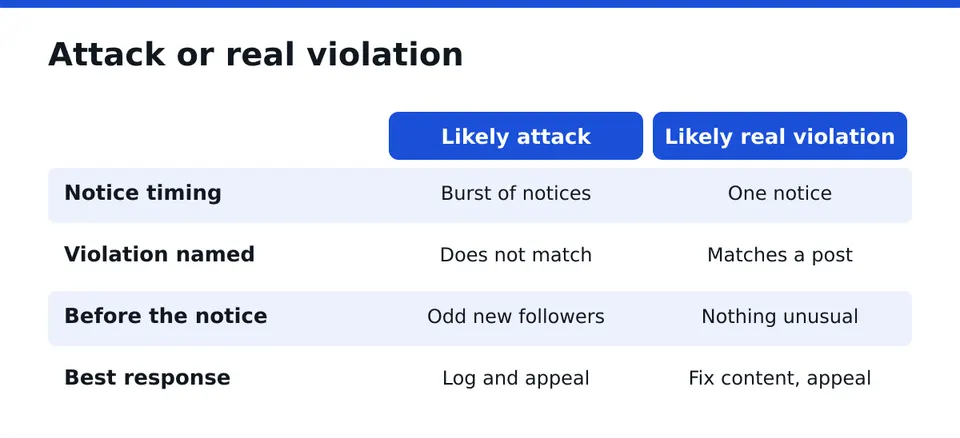
Signs of a targeted attack:
- Several notices or restrictions arrive within hours, covering unrelated posts.
- Notices cite violations that clearly do not match the content.
- A sudden spike in strange follows, comments or DMs from new, empty profiles just before the restriction.
- A competitor or an angry party recently threatened you, or boasted about "dealing with" your page.
- Several accounts you run, or your Page and ad account, are hit at once.
Signs of a real violation:
- The notice names a specific post, and when you look at it honestly, it uses copyrighted music, a banned product claim, or a borderline image.
- The same type of content was removed before.
If the notice is vague, read it twice and screenshot it. The exact wording is your starting point for the appeal.
Step 4: Secure the account before anything else
Attackers sometimes pair false reports with a hijack attempt, hoping you panic and click a "fix it" link. So lock the doors first.
- Change your password to a new, unique one, from a device you trust.
- Turn on two-factor authentication, preferably with an authenticator app rather than SMS.
- Check Accounts Center for unknown devices and log them out.
- Review the email and phone number linked to the account. Make sure they are yours.
- Remove third-party apps you do not recognize.
Only you should ever log in to your account. Nobody legitimate needs your password or a login code, including anyone who offers help. A common mistake is to send a code to a "support agent" who contacted you first. Never do that.
Step 5: Document the evidence while it is still visible
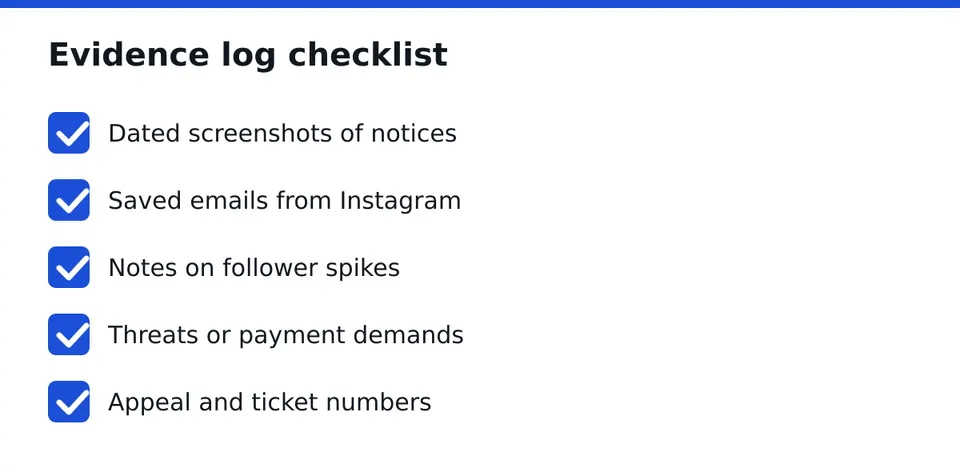
Few people do this and it is the most useful thing you can do. Notices disappear, accounts go dark, and memory fades. Keep a simple log.
Evidence log: what to capture
- Date and time of every notice, restriction or removal, with your time zone.
- Screenshots of the full on-screen message, for example "Your account has been disabled" or "We removed your post because it goes against our Community Guidelines".
- Emails from Instagram or Meta, with full headers if you can save them.
- Follower and activity spikes: new accounts, odd comments, repeated DMs.
- Threats or offers: any message demanding payment or hinting at what will happen.
- Your own posts that were flagged, saved with their dates.
- Support ticket or appeal numbers and what you wrote.
Example: you receive three notices on one afternoon for posts published months ago, and ten new empty profiles follow you an hour earlier. Your log shows the order of events. That pattern tells a reviewer more than a long angry message does.
Step 6: Appeal with clear, factual wording
Use the in-app option when it is offered, usually Request review or Disagree with decision. Appeal each restriction separately.
Keep the text short:
- Say which content or account was affected.
- State that you believe the decision was made after coordinated false reports, and why you think so.
- Point out that the content follows the Community Guidelines, and name the rule if you can.
- Stay polite. Insults and capital letters do not help.
A frequent mistake is to file the same appeal over and over within minutes. It adds noise, not weight. Submit once per decision, record it, and wait.
How long does it take?
Nobody can promise a timeline. It can be quick or take a while, and it varies by case. Check your email, including spam, and the app's Support Requests section.
Can you find out who reported you?
No. Reports are anonymous. Do not trust anyone who claims to reveal the reporters.
Step 7: Watch for extortion and fake fixers
Attackers sometimes demand money to "stop the reports". Other scammers appear after a removal, offering a guaranteed return of the account for a fee. Both prey on stress.
Red flags:
- They contact you first, by DM, comment or email.
- They claim a special line to Meta or inside access.
- They promise a guaranteed result or a fixed day.
- They ask for your password, a login code, or remote access.
- They want payment in gift cards or crypto, or fully upfront with no written terms.
- They cannot name a registered company or give a written contract.
Paying an extortionist rarely ends it. Keep the messages as evidence, do not reply with personal details, and run the offer through a scam check. RESCUNO offers a free Scam Check for exactly this.
Step 8: Keep the business running while you wait
An account can be down for days or longer, so plan for lost reach and income.
- Export your contact list, or move your audience to an email list or a messaging channel.
- Keep a backup Page or a second channel with a pinned explanation, such as a short note and a link.
- Tell key clients and partners directly that you are resolving a platform issue.
- Pause ads on affected ad accounts so you do not burn budget on a restricted profile.
- Save your content library elsewhere.
If the account is a company profile, the details in our guide on Instagram business account disabled will help you prepare.
Step 9: Report abuse and reduce future risk
If you identify accounts harassing you or running a campaign, you can report them through the normal report tools in the app. Report what you can document and stay within the rules yourself. Do not retaliate with your own reports.
Prevention is plain:
- Know the current Community Guidelines and check your older posts against them.
- Remove or fix content that is borderline, such as unlicensed music or exaggerated claims.
- Keep two-factor authentication on, and keep your recovery email current.
- Limit admin access and review who has it.
A clean account with a good history is much harder to knock down.
Step 10: Know when to ask for assessed help
Self-help works for many cases. Get a second opinion when several accounts or a Page and ad account fall at once, when appeals go nowhere, or when money is on the line.
In one real case, a business lost all its accounts after coordinated false reports. Meta later confirmed in writing that the reports were coordinated. I cannot promise the same outcome for you, and nobody honest can. It does show that these attacks are real and that careful documentation matters.
RESCUNO is a registered company and works under a written contract. We never ask for your password, and you log in yourself. We also offer Guardian + Recovery Guarantee for ongoing protection. Not sure where you stand? Message us on WhatsApp for a free case assessment and we will tell you plainly what looks recoverable and what does not.
Frequently asked questions
Can false reports get my Instagram account banned?
They can contribute, mostly when content is borderline or the account already has strikes. Reports trigger a review, they are not a verdict. A clean account with accurate appeals and good documentation has a much better position.
How many reports does it take to get an account removed?
There is no public number, and anyone quoting one is guessing. Volume alone should not decide the outcome. What the reviewed content shows, and the account's history, matter much more than the count.
How do I know if my account is being mass reported?
Look for several unrelated notices in a short time, vague or mismatched violation reasons, and a spike of new empty followers or comments beforehand. You cannot see who reported, so rely on the pattern in your log.
Does Instagram review reports manually?
Both happen. Automated systems look at many reports first, and some cases reach human reviewers. You cannot tell in advance which route yours takes, so write your appeal clearly enough for a person to follow.
Is someone offering to remove my account for money a scam?
Treat it as a scam or extortion. Nobody outside the platform can guarantee a removal. Do not pay, do not share codes, save the messages as evidence, and secure your account with two-factor authentication.
Independent site, not affiliated with Meta, Instagram, Facebook, WhatsApp, iPhone, Android.
Lucas Majewski - Founder, RESCUNO
Lucas is the founder of RESCUNO. His team helps owners of disabled, suspended and hacked Instagram and Facebook accounts, Meta ad accounts and Facebook Pages, working under a written contract and never asking for a password.