
Instagram Disabled for Fraud and Deception: What to Do
In short
"Fraud and deception" is the reason Instagram gives when it believes an account was used to mislead people, whether by you or by someone who hijacked it. First work out which case you are in, gather your proof, then appeal in the app and check any recovery offer before you engage with it.
Published
Contents
- Step 1: What does "fraud and deception" actually mean?
- Step 2: Was it a real violation or a hijack?
- Step 3: Read the disable notice carefully
- Step 4: Prepare your evidence before you appeal
- Step 5: File the appeal in the app
- Step 6: What timeline and outcome can you expect?
- Step 7: What if the appeal is rejected?
- Step 8: How do you spot a recovery scam?
- Step 9: What should a written contract include?
- Step 10: Secure the account once it is back
- Step 11: How do you avoid a repeat?
Step 1: What does "fraud and deception" actually mean?
It is a broad label. Instagram applies it when an account looks like it was used to trick people: fake giveaways, impersonation, misleading offers, or links that lead to scams. The label says nothing about who did the tricking.
That is why honest accounts get caught too. In one real case, a business with a long advertising history received this exact reason after false reports. The reports were the trigger, not its own behavior. So read the label as "our system saw a pattern that looks like deception", not as a verdict on you.
Step 2: Was it a real violation or a hijack?
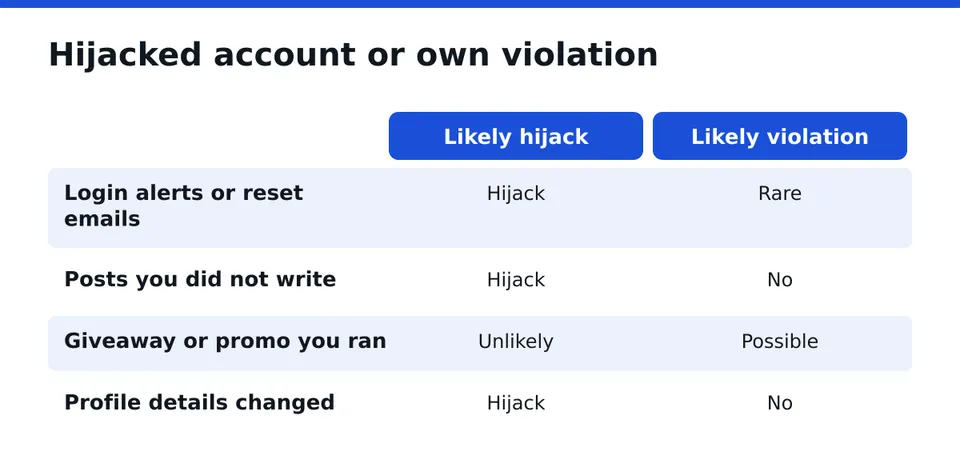
This is the step most guides skip, and it changes everything that follows. Ask yourself:
- Did you or your team run giveaways, promotions or reposts that could look misleading?
- Did you get a login alert, a password reset email or a strange device notice before the lock?
- Do followers report messages or posts from your account that you never wrote?
- Does your profile show changes you did not make, such as a new bio, email or link?
If the answers point to a stranger, the account was probably used by someone else to run a scam, and Instagram then disabled it for that activity. Say so plainly in your appeal. If the answers point to your own content, be ready to explain it honestly. Do not deny what the record shows.
Step 3: Read the disable notice carefully
Open the email or the in-app screen and copy the wording. The notice usually says your account was disabled for violating the Community Standards, and in this case names fraud and deception. Note the date, the email address that received it and whether an appeal button is offered.
A common mistake here: do not create a new account and repost the same content straight away. It can look like evasion and complicate the original case. Also check the sender address of any email. Real notices do not ask for your password or a login code, ever.
Step 4: Prepare your evidence before you appeal
An appeal goes better when it is specific. Collect these before you touch the form:
- The original disable email or a screenshot of the in-app message.
- The email address and phone number linked to the account, and any old confirmation emails from Instagram.
- A photo ID that matches the name on the profile, if the account is personal.
- For a business: registration details, a website, invoices or ad receipts that show a real operation.
- Screenshots of past posts, promotions and rules of any giveaway you ran.
- For a hijack: password reset emails, login alerts, and messages from followers about scam activity.
Keep everything in one folder. Do not edit screenshots. Clean, unaltered proof is easier to believe.
Step 5: File the appeal in the app
Open Instagram and try to log in. On the disabled screen, tap the option to request a review or Learn more, then follow the prompts. Use the same device and network you normally use, since that helps the account look familiar.
Write a short, calm statement. Say what the account is for, that you believe the decision was a mistake or that the account was hijacked, and attach the proof from step 4. Skip anger and long stories. One clear appeal beats five rushed ones. Only you should log in and submit it.
Step 6: What timeline and outcome can you expect?
No one outside Instagram can tell you a reliable timeline. Some people hear back quickly, others wait much longer, and some get no clear answer. Outcomes vary: restored, kept disabled, or asked for more verification such as a video selfie.
Be wary of anyone who quotes a fixed number of days. Nobody can guarantee one. For a closer look at the general process, see our page on an instagram account disabled.
Step 7: What if the appeal is rejected?
A rejection is not always the end. First, check whether your evidence was complete and whether the account was a hijack that you described poorly. Then fix the gaps rather than resending the same text.
If you run a business, the stakes are higher: linked Pages, ad accounts and customers can all be affected. Our guide to an instagram business account disabled covers those links. If you want a second pair of eyes, a free case assessment can tell you what looks fixable and what does not, without promising a result.
Step 8: How do you spot a recovery scam?
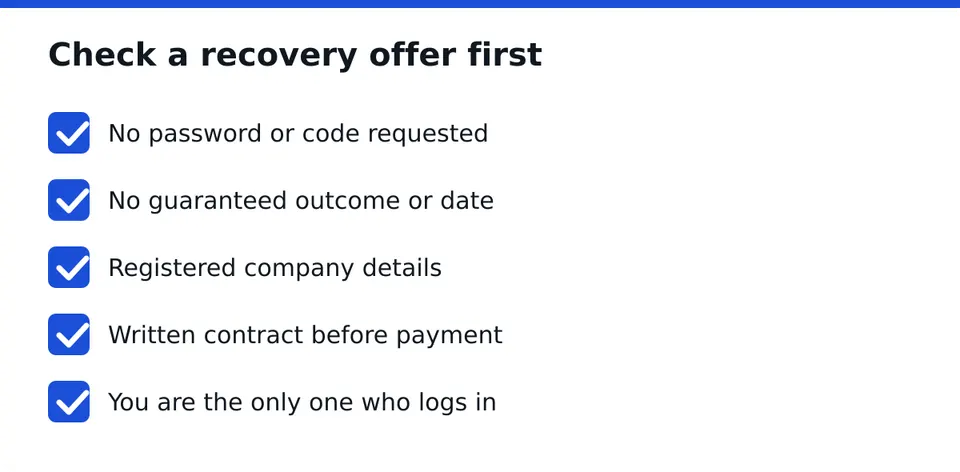
People who are locked out are prime targets. Fake helpers often message you in comments or DMs, claim a special line into Meta, or demand payment up front by gift card or crypto. Treat these as red flags:
- They ask for your password or a login code. No legitimate service needs either.
- They guarantee recovery or a date.
- They claim to be affiliated with Meta.
- They have no company details and no written terms.
- They pressure you to pay immediately.
Before engaging with any offer, run it through a free scam check. RESCUNO offers a Scam Check at no cost, and you can send the offer you received for review.
Step 9: What should a written contract include?
A serious provider works under a written contract. RESCUNO is a registered company and handles account recovery this way. Whoever you pick, compare the terms:
| Item | What good looks like |
|---|---|
| Scope | Clear description of which account and what work |
| Your access | You log in, nobody else does |
| Outcome wording | No promise of a result or deadline |
| Company identity | Registered name and contact details |
| Payment terms | Written, with no surprise add-ons |
Step 10: Secure the account once it is back
If you get access, change the password straight away and use a long, unique one. Turn on two-factor authentication, preferably with an authenticator app rather than SMS. Review the email and phone number on the account, check logged-in devices and remove any you do not know. Revoke third-party apps you do not use.
If the lock came from a hijack, this step matters most. Guardian-type monitoring can help you keep watch afterward, but it adds to good habits and does not replace them.
Step 11: How do you avoid a repeat?
Keep giveaways clear: state the rules, the organizer and that Instagram is not involved. Do not repost offers you cannot verify. Never use a name or logo that looks like another brand. Respond to impersonators by reporting them, not by copying their style.
For a business, keep records of ads, invoices and campaigns in one place, so the next review has proof ready. If anything feels unclear, message us on WhatsApp for a free case assessment and we will tell you honestly what we see.
Frequently asked questions
Why was my Instagram disabled for fraud and deception?
Instagram's systems saw a pattern that looks like misleading activity, such as fake giveaways, impersonation or scam messages. It can also follow false reports or a hijack by someone else. The label alone does not show which case applies, so check your account history.
Can a disabled Instagram account be recovered?
Sometimes, yes. A clear appeal with solid evidence gives the review the best material to work with. No one can promise a result, and anyone who does should be treated with caution. A free case assessment can show what looks realistic.
How long does an Instagram appeal take?
There is no fixed timeline. Some people hear back within days, others wait longer or get no clear reply. Avoid services that quote an exact number of days, because the decision rests with Instagram and nobody outside can guarantee timing.
How can I tell if a recovery service is a scam?
Red flags include asking for your password or login codes, guaranteeing recovery, claiming a link to Meta, demanding quick payment and offering no written terms or company details. A legitimate service works under a written contract and you remain the only one who logs in.
How do I avoid being disabled again?
Turn on two-factor authentication, keep giveaway rules transparent, avoid anything that resembles impersonation and report fake accounts instead of copying them. Businesses should also keep ads, invoices and registration details ready as proof of a genuine operation.
Independent site, not affiliated with Meta, Instagram, Facebook, WhatsApp, iPhone, Android.
Lucas Majewski - Founder, RESCUNO
Lucas is the founder of RESCUNO. His team helps owners of disabled, suspended and hacked Instagram and Facebook accounts, Meta ad accounts and Facebook Pages, working under a written contract and never asking for a password.