
How to Recover a Hacked Facebook Account After Email Change
In short
Yes, you can often get a hacked Facebook account back even when the hacker changed the email, if you start from the security alert in your old inbox and use only Facebook's official recovery pages. No one can promise a result or a timeline, but a prepared, careful request gives you the best chance of a clean review.
Published
Contents
- Start with the email change alert
- Pick your path by situation
- Secure the email account first
- Use the official hacked account page
- Recovery through Find Your Account
- Prepare for identity verification
- Reset the password and log out other sessions
- Turn on two-factor authentication
- Review linked apps and login activity
- Report impersonation and warn your friends
- Spot fake recovery help
- When official steps keep failing
- Cleanup timeline after recovery
- Your next step
Start with the email change alert
When a hacker swaps the email on your account, Facebook usually sends a notice to the old email address. That message is your best tool. Open the inbox tied to the account and search for messages about a changed email, a new login, or a password change.
Look at the sender and the links carefully. A genuine notice comes from a facebookmail.com address and its links lead to facebook.com. If the message looks odd, do not click it. Type facebook.com into your browser and work from there.
If the alert contains a link to undo the change, use it quickly. Not every alert offers one, and the link does not stay usable forever, so treat it as time-sensitive. More on that below.
Pick your path by situation
Most guides give one straight list. Real cases branch. Find the line that matches you and follow it.
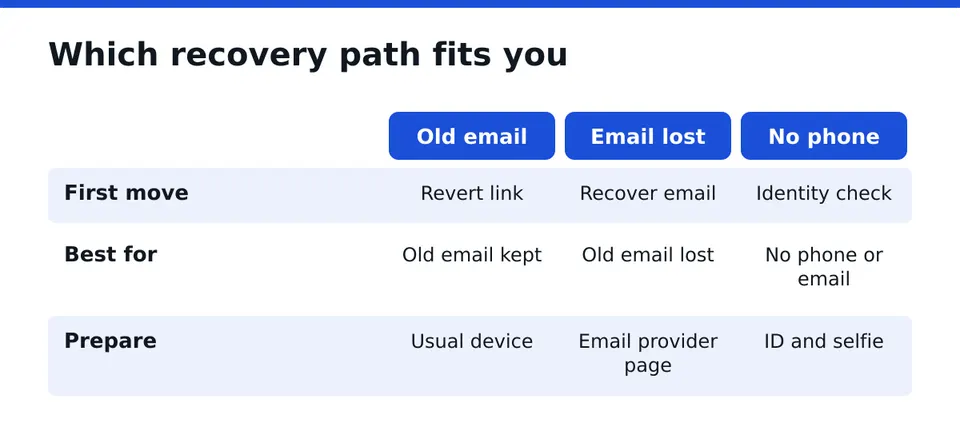
You still have the old email
This is the best position. Use the alert in the old inbox, revert the change, then reset the password. Secure the email account itself first, as described in the next section.
You no longer have the old email
Try to regain the email first. Email providers have their own recovery pages, and a recovered inbox often unlocks the Facebook path too. If the email is gone for good, go to the official hacked account page and the Find Your Account page, and choose the option to use a new contact point when offered.
You have no phone number or email access
This is harder, not impossible. Facebook may offer identity checks such as a video selfie or an ID upload. Trusted contacts or a recognized device can also help. Prepare carefully (see the preparation section) before you submit anything.
Your account shows as disabled
A disabled account is a different problem from a hacked one. Sometimes a hacker's activity triggers it. Follow the on-screen appeal option, keep the details it shows, and do not create duplicate accounts in the meantime.
Secure the email account first
Before touching Facebook, make sure the inbox you use for recovery is safe. If the hacker also has that mailbox, they will receive every code and link you request.
Change the email password, sign out of all other sessions, and turn on two-factor authentication there. Check the forwarding rules and filters too. Attackers sometimes add a rule that hides Facebook messages or forwards them elsewhere. Delete anything you did not create.
Only the owner should ever log in to your accounts. Nobody legitimate needs your password or a login code.
Use the official hacked account page
Facebook runs a dedicated page for compromised accounts. Reach it by typing the address yourself or through the Help Center, not from a link in a message or an ad. Choose the option saying your account was hacked and follow the prompts.
You will be asked for the email or phone you used, an old password if you remember one, and some questions about what happened. Answer plainly and consistently. Use a device and a network you normally use, such as your home Wi-Fi, because familiar signals help the review.
Revert the email change link
The notice sent to your old address may include a link to secure your account or reverse the change. Open it on your usual phone or computer. If it works, you should be able to set a new password and review recent activity. If it says the link has expired or was already used, move on to the next route rather than clicking it repeatedly.
Recovery through Find Your Account
The Find Your Account page lets you search by email, phone number, name or username. Pick your profile when it appears. Facebook then lists the contact methods it can use to send a code.
If the listed email is now the hacker's, choose the option saying you no longer have access. You can then enter a new email or number for the review. Use an address that only you control, and one the hacker has never seen.
Expect a few attempts. Do not spam requests. Repeating them many times in a row can slow things down, so submit carefully, then wait for a reply.
Prepare for identity verification
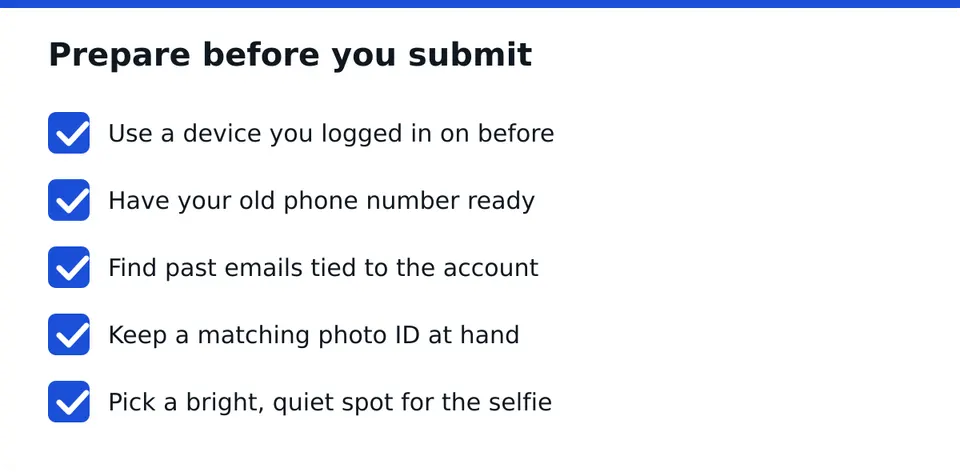
This is where many people lose time. Gather what you need before you start.
- A device you used to log in before, kept on its usual network.
- Your old phone number, even if you changed it since.
- Past emails tied to the account.
- A government photo ID that matches the name on the profile.
- A well-lit, quiet place for a video selfie.
Video selfie and ID
Facebook may ask for a short video selfie to match your face against your profile photos. Remove hats and glasses, face the light, and follow the on-screen movement prompts slowly. If the system keeps rejecting you, the cause is often poor light, a blurry camera, a very different appearance from your profile photos, or a name mismatch on the ID. Fix one thing at a time and try again later.
Trusted contacts and recovery codes
If you set up trusted contacts or saved recovery codes earlier, use them now. Recovery codes work as one-time backups and can bypass a missing phone. Keep them somewhere offline once you are back in.
Reset the password and log out other sessions
Once you are in, change the password to a new, unique one that you have never used elsewhere. A password manager makes this simple. Then open the security settings and choose to log out of all sessions so the hacker's device is kicked out.
Check the email and phone number on the account. Remove any you do not recognize. Make sure the recovery email is one you control.
Turn on two-factor authentication
Set up two-factor authentication using an authenticator app rather than only text messages, since SIM swaps can intercept texts. Save the backup codes in a safe place. This step answers a common worry: if the hacker kept a session open, the password reset and the full log-out remove it, and two-factor blocks a return through the front door.
Review linked apps and login activity
Open the login activity list and look for unfamiliar devices or places. Log those out. Then review connected apps and websites and remove anything you do not use or recognize. Old third-party apps are a common back door.
Also check your Pages, ad accounts and Business Manager. Hackers often add themselves as admins or attach their own payment method. Remove unknown people from roles, review any ads they ran, and check that billing details are yours. If you lost admin access to a business asset, note the asset names and IDs for your request.
Report impersonation and warn your friends
If the hacker used your profile to message people, ask for money or post links, tell your contacts directly. A short post or a message from another channel is enough: your account was compromised, ignore any money requests or links from it.
If a fake profile copies your name and photos, report it from that profile using the impersonation option. Screenshots of the scam messages help your case.
Spot fake recovery help
After a hack, you become a target again. Scammers monitor public posts and comments asking for help, then reply with offers.
Treat it as fake if any of these apply:
- They ask for your password or a login code.
- They claim a special line or partnership with Meta.
- They promise guaranteed recovery or an exact timeline.
- They want payment in gift cards or crypto up front, with no contract.
- They contact you first through a comment or a direct message.
A legitimate helper is a registered company, works under a written contract, never asks for your password, and is clear about what cannot be promised. Only you log in to your account.
When official steps keep failing
If you have been rejected several times, stop and reassess. Check that your contact details, device and ID are consistent. Wait a reasonable period between attempts. Look for details you missed, such as a different name on the ID.
At this point a second opinion is worth having. RESCUNO is a registered company that handles hacked, disabled and suspended Instagram and Facebook accounts, Meta ad accounts and Pages, under a written contract. We are independent and have no affiliation with Meta. We do not guarantee outcomes, but a free case assessment shows whether your case has a workable route and what to prepare. Our Scam Check is free if you are unsure about an offer you received.
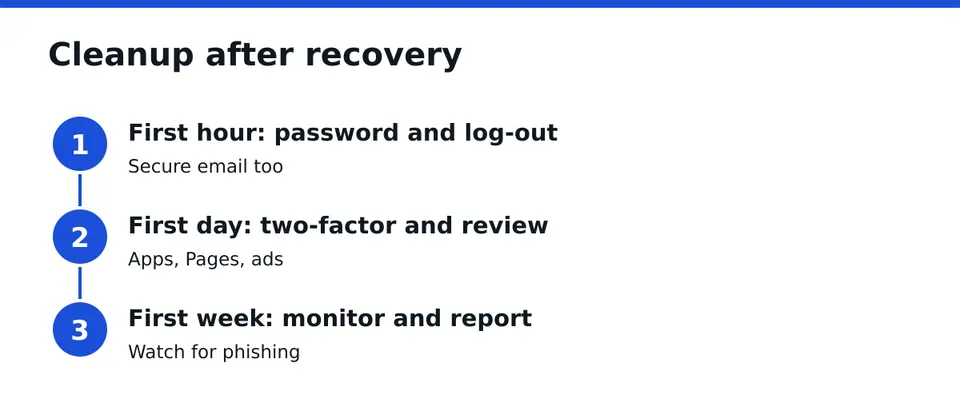
Cleanup timeline after recovery
First hour
- Change the password and log out of all sessions.
- Secure the email account.
- Remove unknown emails and numbers.
First day
- Turn on two-factor authentication and save backup codes.
- Review login activity, apps, Pages and ad accounts.
- Warn your contacts about scam messages.
First week
- Check posts, messages and settings for changes.
- Report any impersonating profiles.
- Watch for phishing emails pretending to be support.
- Update passwords on other accounts that shared the old one.
Your next step
Start with the alert in your old inbox and the official hacked account page. If you are stuck, locked out of the email, or rejected again and again, Message us on WhatsApp for a free case assessment and we will look at your case without asking for a password.
Frequently asked questions
How do I get my Facebook back if the hacker changed my email and password?
Start with the security alert in your old inbox and use the revert link if it still works. If not, use the official hacked account page and Find Your Account, then verify with a new email, a recognized device, or an ID check. Results are never guaranteed.
Can I recover Facebook if I no longer have access to the old email?
Often yes. First try to regain the email through its provider. If that fails, use Find Your Account, choose that you no longer have access, and submit a new contact point only you control. Facebook may then ask for a video selfie or ID.
What is the email change revert link and how long is it valid?
It is a link in the alert sent to your old address that lets you undo the change and secure the account. It is time-limited, and I cannot give an exact period. Use it as soon as you see the alert, on your usual device.
Why does Facebook keep rejecting my video selfie?
Common causes are poor lighting, a blurry camera, glasses or hats, a face very different from your profile photos, or a name mismatch with your ID. Fix one issue at a time, use a familiar device, and wait between attempts rather than resubmitting repeatedly.
How do I know if a recovery service is a scam?
Be wary if they ask for a password or login code, claim a link to Meta, promise guaranteed results, demand untraceable payment, or contact you first. A legitimate company is registered, uses a written contract, and tells you plainly what it cannot promise.
What should I do right after getting my account back?
Change the password, log out all other sessions, secure your email, and turn on two-factor authentication with an authenticator app. Then review login activity, linked apps, Pages and ad accounts, and warn your friends about any scam messages sent from your profile.
Independent site, not affiliated with Meta, Instagram, Facebook, WhatsApp, iPhone, Android.
Lucas Majewski - Founder, RESCUNO
Lucas is the founder of RESCUNO. His team helps owners of disabled, suspended and hacked Instagram and Facebook accounts, Meta ad accounts and Facebook Pages, working under a written contract and never asking for a password.