
Can Facebook Help If Your Account Was Hacked?
In short
Yes, Facebook has recovery routes for hacked accounts, even when the email was changed. Start with the security alert in your old inbox, use the revert link in it, then move to the official hacked-account flow if that fails. Act quickly, because the undo link may expire.
Published
Contents
- Can Facebook help if a hacker changed my email?
- What should I do in the first few minutes?
- How do I undo an email change on Facebook?
- How long do I have to use the security link?
- What are the steps on the hacked account recovery page?
- What if I can't access the old email either?
- What if the hacker also changed my phone number?
- Why does Facebook ask for a video selfie or ID?
- Can I recover my account without a phone number?
- How should I document the case before contacting anyone?
- What about business pages and ad accounts?
- How do I know if a recovery service is a scam?
- When is a written-contract recovery service an option?
- What should I do right after I regain access?
- What if recovery fails?
Can Facebook help if a hacker changed my email?
Yes, but only through its own official routes, and the first one is already sitting in your inbox. When an email address on an account changes, Facebook usually sends a notice to the old address. That message is your best starting point.
Search your old inbox, including spam and trash, for messages from Facebook about a changed email or a new login. Do not click links in messages from anyone else, even if they look the same.
What should I do in the first few minutes?
Open the security alert and use the revert link. Before anything else, check that your own email account is safe. If the hacker also got into your email, they can read every reset message Facebook sends.
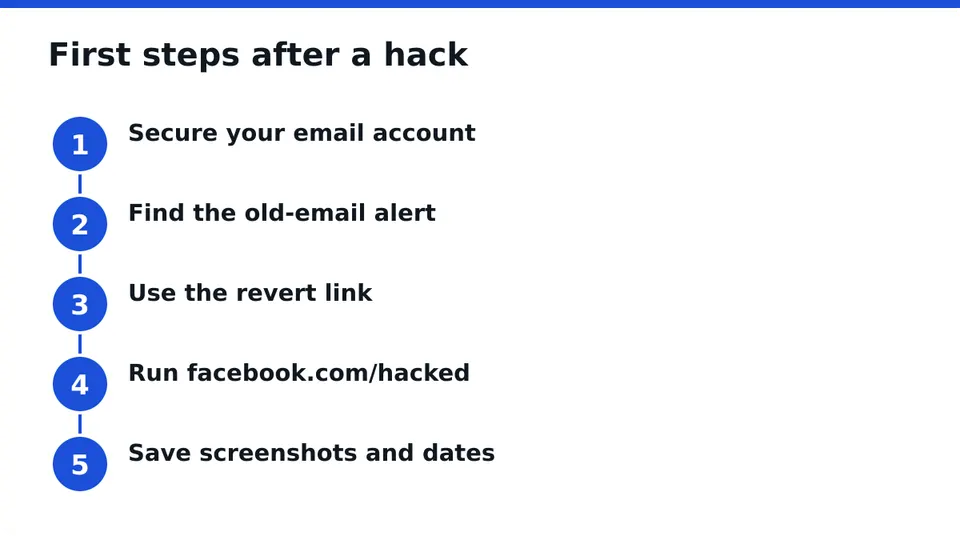
So the order is:
- Secure your email account first: change its password, sign out other sessions, turn on two-factor authentication.
- Find the Facebook alert in the old inbox.
- Use the revert link in it.
- Only then go back to Facebook.
Skipping step 1 is the most common reason a recovery gets undone a second time.
How do I undo an email change on Facebook?
Click the link in the alert email that says the change was not you, often labeled something like secure your account. It should take you to a page that restores the old address and lets you set a new password.
If the link works, log out all sessions, change the password and continue to the checklist at the end of this article. If it does not work, go to the next section.
How long do I have to use the security link?
There is no number I can honestly give you, because Facebook does not publish one that I can point to. What I can say is that the revert link may expire, and many guides skip this. Treat it as time-sensitive and use it the same day you see it.
If the link has stopped working, you can still use the hacked-account flow below. You have not lost every option.
What are the steps on the hacked account recovery page?
Go to facebook.com/hacked and follow the prompts. The wording changes from time to time, so rely on what the screen shows rather than on an old menu path.
In general you will be asked to:
- Identify your account by name, old email or old phone number.
- Say that you cannot log in or that someone else did.
- Choose a contact method Facebook still has on file.
- Set a new password once you are let in.
Try this from a trusted device and location, such as your own phone or laptop at home, where you have logged in before. Facebook weighs that familiarity.
What if I can't access the old email either?
Then the hacked flow is your route, and you should first try to regain the email itself through your email provider's own recovery tools. Once the email is yours again, the Facebook alerts will become readable.
If you cannot get the email back, use facebook.com/hacked and choose the option that says you no longer have access to those contact details. Facebook may then offer an identity check.
What if the hacker also changed my phone number?
This happens often when the email was swapped, and it blocks the usual code-by-text route. Do not keep requesting codes to a number you no longer control. It will not help.
Instead:
- Use the old email revert link if it is still alive.
- Run the hacked flow from a device you have used before.
- Pick the option that says you cannot use those details and follow the verification offered.
- Contact your mobile carrier if your phone number itself was taken over, since that is a separate problem from Facebook.
Why does Facebook ask for a video selfie or ID?
It is an identity check, meant to confirm that you are the person the account belongs to. Facebook may ask for a government ID or a short video selfie, depending on the case.
Use only the upload screens inside the official flow. Never send ID photos or selfies to someone who contacts you by message or comment offering to help.
Can I recover my account without a phone number?
In many cases yes. The old email, a trusted device and the identity check are all routes that do not need the phone. None of them is guaranteed, and results differ from case to case, but a missing number is not a dead end.
How should I document the case before contacting anyone?
Save evidence now, while the alerts still exist. It helps every attempt, official or otherwise.
- Screenshot the security alert emails, with dates and times.
- Note the old email, phone number and profile URL.
- Record when you lost access and what you noticed first.
- Save any suspicious messages sent from your account.
Keep it in a folder only you can open.
What about business pages and ad accounts?
If the hacked profile is an admin of a Page or an ad account, treat those as part of the same incident. Hackers often go after admin roles and ad spend, not just the profile.
Once you are back in:
- Check the list of Page admins and remove anyone you do not know.
- Review ad accounts, payment methods and recent spending.
- Look at linked apps and remove any you do not recognize.
- Make sure a second trusted person holds an admin role, so one hack does not lock you out.
If you cannot get in at all, document which Pages and ad accounts were tied to the profile. That list matters later.
How do I know if a recovery service is a scam?
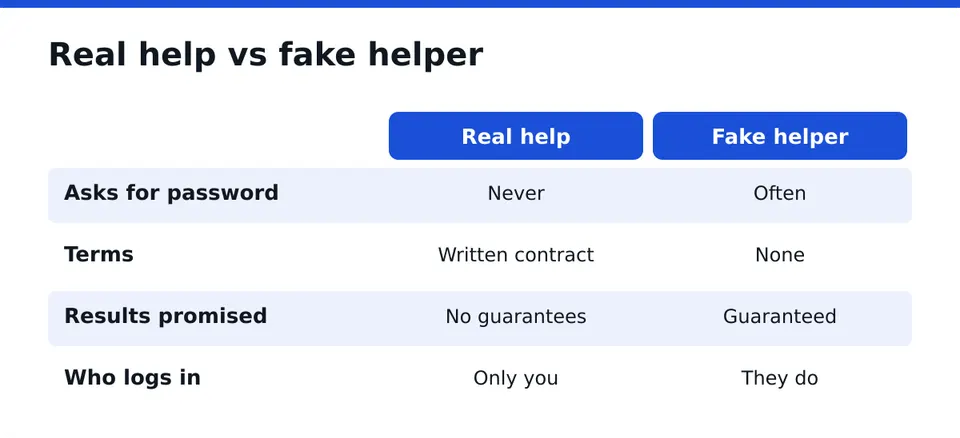
A real service never asks for your password or login codes, and it never needs to log in as you. Only the owner logs in. That one rule filters out most fakes.
Watch for these signs:
- Unsolicited messages or comments saying they can get your account back.
- Requests for your password, a code or remote access.
- Promises of guaranteed or instant results.
- Payment only by untraceable methods, with no written terms.
RESCUNO offers a free Scam Check for exactly this situation: you can have an offer or a message looked at before you act on it.
When is a written-contract recovery service an option?
After you have tried the official steps, or if you are stuck at the identity check or locked out of business assets, a professional service can be a reasonable next move. RESCUNO is a registered company that works under a written contract, and it never asks for your password. We cannot promise an outcome or a timeline, and we have no special line to Meta.
The first step is a free case assessment, where we look at your situation and tell you honestly what is realistic. See more on the about page.
What should I do right after I regain access?
Lock it down in this order:
- Change the password to a new, unique one.
- Log out of all sessions.
- Turn on two-factor authentication, preferably with an authenticator app.
- Review linked apps, Pages and ad accounts.
- Warn friends that messages sent from your account were not you, especially any asking for money or codes.
- Report any fake profile using your name through the profile's report option.
What if recovery fails?
Do not start over blindly. Repeat the hacked flow from a trusted device after some time, keep your documentation, and report any impersonation profile. Then consider a case assessment.
If you want a second pair of eyes on your case, Message us on WhatsApp for a free case assessment and bring your screenshots and dates.
Frequently asked questions
Can Facebook help if a hacker changed my email?
Yes. Facebook has recovery routes, starting with the security alert sent to your old email and the hacked-account flow at facebook.com/hacked. Results vary by case, so use the official steps first and keep screenshots of everything as you go.
How do I undo an email change on Facebook?
Open the alert Facebook sent to your old email address and click the link saying the change was not you. It should restore the old address and let you set a new password. Secure your email account before you do this.
What if I can't access the old email either?
Try to regain the email through your provider's own recovery tools first. If that fails, use facebook.com/hacked and choose the option saying you no longer have access to those contact details. Facebook may then ask for an identity check.
Why does Facebook ask for a video selfie?
It is an identity check to confirm that you are the real owner of the account. Facebook may ask for an ID or a video selfie. Submit them only inside the official flow, never to someone who messages you offering help.
How do I know if a recovery service is a scam?
Be wary of anyone who asks for your password or login codes, contacts you first, promises guaranteed results or offers no written terms. Only the owner should ever log in. A free scam check can help you test an offer before you act.
Independent site, not affiliated with Meta, Instagram, Facebook, WhatsApp, iPhone, Android.
Lucas Majewski - Founder, RESCUNO
Lucas is the founder of RESCUNO. His team helps owners of disabled, suspended and hacked Instagram and Facebook accounts, Meta ad accounts and Facebook Pages, working under a written contract and never asking for a password.